

- External meetings have at least one participant from outside your company. They follow your personal settings.
- Internal meetings have only participants from your company. They follow your team’s settings.
External meetings
- In Attention, click your name at the bottom of the sidebar, then Settings.
- Under Call Settings, find Join external calls when and click Edit.
-
In External call joining settings, check the meetings you want Attention to join.
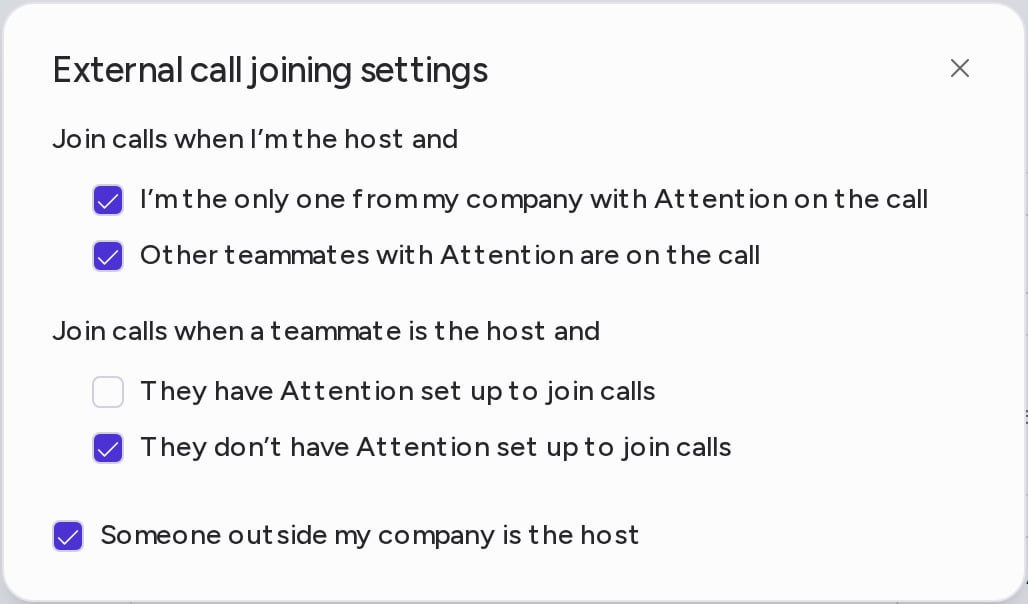
- I’m the only one from my company with Attention on the call: on.
- Other teammates with Attention are on the call: on.
- They have Attention set up to join calls: off. The host’s notetaker records the meeting, so yours stays out. Check it if you also want your own recording.
- They don’t have Attention set up to join calls: on.
Internal meetings
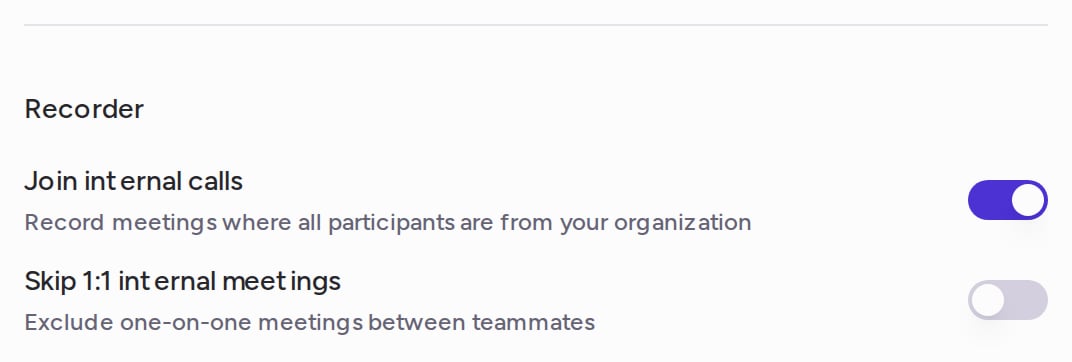
Internal meetings follow your team’s settings. Go to Settings → Teams, open your team, and choose the Settings tab. Under Recorder:- Join internal calls: on by default. Attention records meetings where all participants are from your organization.
- Skip 1:1 internal meetings: off by default. When it is on, Attention skips one-on-one meetings between teammates: meetings with “1:1” or “one on one” in the title, or with only two people from your company.
Join or skip one meeting
To change a single meeting without touching these rules, use the Join checkbox next to the event under Home → Upcoming calls. See Get Attention into Your Calls.Why didn’t Attention join my meeting?
On Home, hover the ? icon next to an upcoming event to see why Attention is or isn’t set to join it. These are the most common reasons:The event has no meeting link
The event has no meeting link
Attention joins through the meeting link, so the Join checkbox is disabled for events without one. Add a Zoom, Google Meet or Microsoft Teams link to the event in your calendar.
You haven't accepted the invitation
You haven't accepted the invitation
Attention only joins meetings you have accepted. Accept the invitation in your calendar.
Join was unchecked for that event
Join was unchecked for that event
Join was turned off for this one event. Check Join again under Home → Upcoming calls.
A teammate is the host
A teammate is the host
When a teammate with Attention hosts an external meeting, their notetaker records it, and They have Attention set up to join calls is off by default. To have yours join too, check that option in External call joining settings.
It's an internal meeting
It's an internal meeting
In an internal meeting, only the organizer’s notetaker joins. If you organized it, check your team’s Join internal calls and Skip 1:1 internal meetings switches in Settings → Teams, on your team’s Settings tab under Recorder.
The host is outside your company
The host is outside your company
Check Someone outside my company is the host in External call joining settings.
Need help? Contact support@attention.com.